ASNA Knowledge Base
Technical references, how-tos, and trouble-shooting for ASNA products

Note: This article applies only to .NET Framework Database Names. The COM Database Manager does not support exporting or importing database names.
DataGate stores Database Names definitions in an encrypted file named DatabaseNames.config, located in the Windows file system at:
%LocalAppData%\ASNA\DataGateThe .NET Framework version also supports public Database Names, stored in:
%ProgramData%\ASNA\DataGateProperties such as user name, password, IP address or server name, etc are stored in this file for each Database Name.
The DatabaseNames.config file is encrypted and can only be unencrypted on the machine on which it was created. You can copy this file to another PC, but it can’t be read on that machine and is of no use there. Do not attempt to edit this file; any attempt to do so will corrupt it.
We recommend you keep a copy of the
DatabaseNames.configfile somewhere safe to guard against it becoming corrupted.
To copy a Database Name (for example, from a development PC to a production Web server) you need to export the Database Name from the source PC and import it on the target PC (which would probably be either a Web server, a fat client end-user PC, or another developer PC). These export and import faciltiies are available in both the ASNA DataGate Explorer from within Visual Studio and in the ASNA DataGate Monitor.
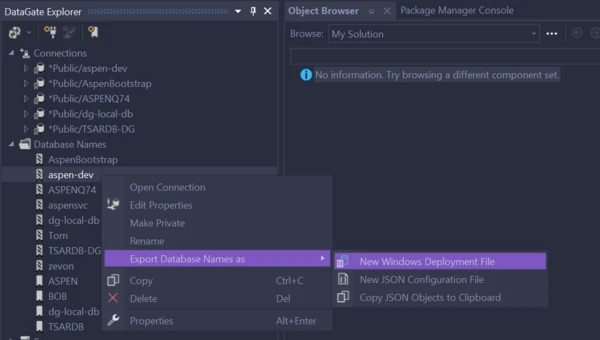
To export a Database Name, right-click on the name you want to export and select “Export Database Name as”.
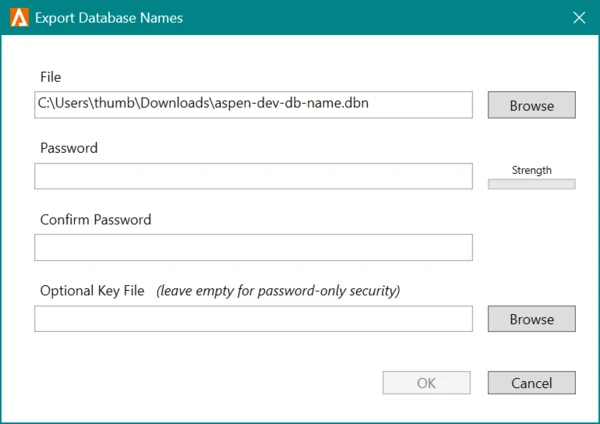
After providing a file name and location, you are prompted for password and optional key file with which to encrypt this exported file.
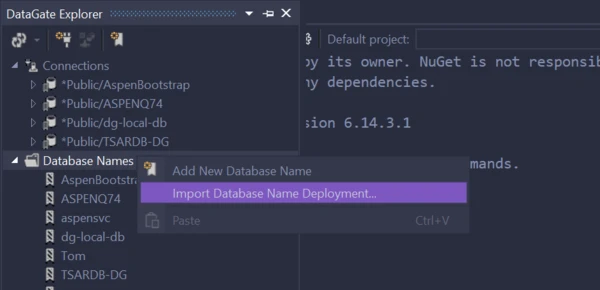
To import a Database Name, right-click the “Database Names” node and select “Import Database Name Deployment…”
After providing a file name and location, you are prompted for the password and optional key file with which to decrypt and import the Database Name. If the Database Name had been encrypted with a key file, that key file must must be copied to the target PC.
Usually when you import a DataBase Name to a target PC, you’ll do so with the ASNA DataGate Monitor on that PC; target machines are unlikely to have Visual Studio installed on them.
A similar article is also available at ASNA’s Monarch Base Documentation site.