ASNA Newsletter
ASNA tips, articles, and news


Spring is here and it’s bluebonnet season in Texas. Our dry fall portends an early, short season. But,if you find the right field, they are very beautiful.
This issue features a warning for AVR 5.0 customers, a how-to article for adding logging to Visual RPG ASP.NET applications, and a sad tale of woe about how technical debt can put your business at risk.
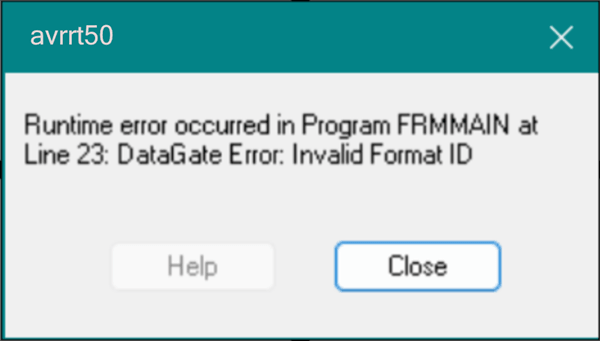
A customer reported an unusual problem with AVR 5.0 the other day. With either deployed binaries or in the AVR 5.0 IDE, he was getting invalid format ID errors—on every file he tried to open.
An invalid format ID error is intended to occur when a file has been changed in the database (ie, add, remove, or rename a field) and the program hasn’t been recompiled to recognize that change.
That he was getting this error during development was especially disconcerting. It would have been impossible, or at least quite nearly so, for the file to change in the time it takes to press F5 to run the program.
AVR 5.0 is retired and hasn’t been tested with Windows 11 for a very long time. Although AVR 5.0 isn’t formally supported on Windows 11, the app had been working fine previously. This issue also didn’t appear to be preceded by Windows updates. We were very stumped. Something surely changed, but we coudn’t determine what changed.
His only option was to upgrade to Visual RPG 5.2 to see if that would resolve the problem—and it did.


Trying to debug a Visual RPG ASP.NET app that doesn’t have effective error logging is like looking for your car keys in the dark. Our example code (available on GitHub) shows how to use the very popular NLog Nuget package to add logging to your AVR ASP.NET application.
There are many Nuget logging packages. Log4Net was one of the first Nuget logging packages and it is very popular. However, NLog, which now boasts 535m total downloads, has pretty much claimed the logging king title from Log4Net. NLog has a ton of features and is very easy to use.
In addition to the NLog repository mentioned above, there is also another ASNA GitHub project that shows how to integrate NLog with global error handling for your AVR ASP.NET applications.

A customer called in the other day with a tech support issue. They were using ASNA Visual RPG 4.0 (AVR), with DataGate 11, on an IBM i Power6 running V7R1. This customer was in the process of upgrading from Windows XP (go figure!) to Windows 11 and was having all kinds of issues with AVR 4.0 on Windows 11.
At one time, this shop had a three-person AVR development team. That team built an AVR application that is very critical to the business, more than 15 years ago. Over time, the company’s developers retired and weren’t replaced. The app was stable—doing what the business needed. It seemed reasonable back then to move on without replacing the developers. A new person had been hired recently and, in addition to his other duties, served as their part IT resource.
AVR 4.0 and DataGate 11 have both been retired for about 15 years and AVR 4.0 is known to not work reliably on Windows 11. To get to a supported version AVR that runs on Windows 11, this company not only needs to upgrade its ASNA products, but their IBM i is a Power6 box that tops out at V7R1. IBM i retired V7R1 in 2018. The company is also looking at a substantial IBM i hardware and software upgrade. And, they need to do these upgrades with no programmers and only a minimal IT staff.
For about 15 years, this organization spent quite nearly zero dollars on the care and feeding of their AVR application and the ecosystem on which it ran. Their business now hangs in the balance as they scurry to ensure the health and well-being of their mission-critical business application.


We’ve talked to a few customers lately who no longer have any employees with ASNA product knowledge. Most of these are due to either retirement or business acquisitions and/or employee reassignment. Even the simplest things, like applying a new license, are sometimes challenging to do without ASNA talent available.
Is your shop running low on Visual RPG talent? Do you need some help with your ASNA Visual RPG application? ASNA’s Services Team can help you with:
Upgrades. ASNA Upgrades are usually pretty straightforward, but challenging to do without any ASNA experience. Our Services Team can help you with your upgrades.
Program fixes and maintenance. Our Services Team can make ongoing program changes and enhancements needed.
Migrating your application’s database. In some cases, you might want to retire your old ASNA application and migrate its database to another platform. Our Services Team can help migrate that old database to a variety of modern database platforms.
Migrating the app. If your application needs to be migrated to a new environment, the ASNA Services Team can also help with that. Our team has extensive .NET, C#, and IBM i programming experience.
Long-term application lifecycle support. If your programming team is maxed-out on other tasks and your AVR applications need ongoing care and feeding that they aren’t getting, the ASNA Services Team can take over and manage the entire Visual RPG application development lifecycle for you. For program fixes, licensing issues, maintenance and enhancements, and deployment, we can be your ongoing, remote Visual RPG programming team.
Visit this page to see the latest ASNA generally-available product downloads.