ASNA Knowledge Base
Technical references, how-tos, and trouble-shooting for ASNA products

This article explains how to use the spankin’ new CSS @scope feature to very effectively scope your CSS to specific elements. CSS has really been on a roll for quite a while now adding new and very useful features. Over the last few years CSS has acquired:
These are all very helpful and important features. They all should be in a modern web developer’s kit bag. A powerful new CSS scoping feature is now available with baseline browser support (which means supported by all modern browsers). This new scoping feature makes it much easier to impose component-based organization on your CSS.
This article provides a quick look at CSS scoping. For more in-depth CSS scoping information see:
FireFox delivered CSS scoping with its version 146.0 which was released on December 9th, 2025. FireFox had been dragging its feet on scoping and this release is what make CSS scoping full baseline (and predictable) across all modern browsers.
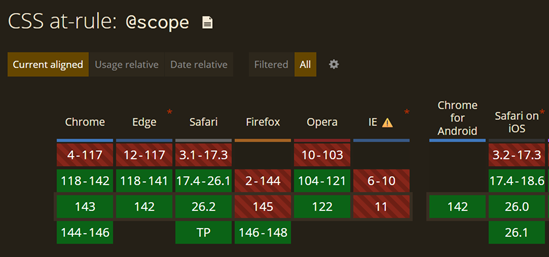
Read the full Can I Use article for CSS @scope.
Let’s say you have this HTML:
<div class="component1">
   <h1>Headline component 1</h1>
   <p>Paragraph for component 1</p>
</div>

<div class="component2">
   <h1>Headline component 2</h1>
   <p>Paragraph for component 2</p>
</div>

<div class="component3">
   <h1>Headline component 3</h1>
   <p>Paragraph for component 3</p>
</div>
that you want to render like this:

With old-school CSS, a way to style to those three elements is:
div.component1 {
   background-color: lightblue;
   padding: 1rem;
}

div.component1 h1 {
   color: blue;
}

div.component2 {
   background-color: orange;
   padding: 1rem;
}

div.component2 h1 {
   color: red;
}

div.component3 {
   background-color: green;
   padding: 1rem;
}

div.component3 h1 {
   color: purple;
}
There isn’t anything wrong with the CSS above. CSS written like it probably styles 90% of the Internet. However, while CSS like this may be easy to maintain initially, it’s lack of structure coupled with CSS’s global nature can lead to tangled, hard-to-manage CSS. It’s likely that over time other CSS will be added somewhere else, perhaps even in another CSS file, that causes hard-to-find, confounding conflicts.
CSS nesting has been baseline-available now for two years. I’ve used it heavily to help write more colocated and rational CSS.
div.component1 {
   background-color: lightblue;
   padding: 1rem;

   & h1 {
      color: blue;
   }
}

div.component2 {
   background-color: orange;
   padding: 1rem;

   & h1 {
      color: red;
   }
}

div.component3 {
   background-color: green;
   padding: 1rem;

   & h1 {
      color: purple;
   }
}
CSS nesting imposes a more ogranized structure. With just a little discipline you can reasonably assume that all of the CSS that applies to div.component1 can be found nested under the corresponding selector.
The problem with nesting is that it can lead to snarly and convoluted deeply indented sub-nesting. CSS nesting gets pretty hard to read if you nest more than two or three levels deep.
As an aside, the August 2023 baseline version of CSS nesting required the
&prefix. However, in December 2023 the&became optional.
CSS scoping is defined with the @scope keyword. The CSS below produces the same results as the preceding CSS, but with a more prescribed method of identifying and organizing the CSS.
@scope (div.component1) {
   :scope {
      background-color: lightblue;
      padding: 1rem;
   }

   h1 {
      color: blue;
   }

}

@scope (div.component2) {
   :scope {
      background-color: orange;
      padding: 1rem;
   }

   h1 {
      color: red;
   }
}

@scope (div.component3) {
   :scope {
      background-color: green;
      padding: 1rem;
   }

   h1 {
      color: purple;
   }
}
This article’s overly simple example “component”:
<div class="component1">
   <h1>Headline component 1</h1>
   <p>Paragraph for component 1</p>
</div>
doesn’t really show off CSS scoping, but you should get the idea. In some ways, this scoping feature is little like CSS nesting. However, scoping throws a tighter band around its host component and doesn’t require convoluted nesting.
CSS’s @scope also introduces the new :scope pseudo class selector. It selects the @scoped root element—which in this case is the scoped parent div tag.
Scoping doesn’t defeat CSS’s baked-in specificity rules. Consider the following CSS and guess what it renders as the background color of the div.component1.
div.component1 {
   background-color: red;
}

@scope (div.component1) {
   :scope {
      background-color: lightblue;
      padding: 1rem;
   }

   h1 {
      color: blue;
   }
}
The rendered result is sneaky. The rendered background color is red. Why? Because the specificity of both selectors (div.component1) seems to match, it’s logical to guess the background color would be lightblue. That would have been my bet on the answer.
Why isn’t the background color red. Because the specificity of div.component1 is 0,1,1 but the specificity of the :scope selector is 0,1,0.
To calculate CSS specificity, the count of ID, class, and type selectors are concatenated and then compared. In the example above, the first value
011and the second is010, so the first wins. See the link below for more info CSS specificity.
It’s probably an edge case, but you need to include div' along with the:scope` selector to make the specificity of the two selectors equal.
With the CSS below, with both selectors having the same specificity, the second one wins and the background color is light blue.
div.component1 {
   background-color: red;
}

@scope (div.component1) {
   div:scope {
      background-color: lightblue;
      padding: 1rem;
   }

   h1 {
      color: blue;
   }
}
Fully understanding CSS specificity is an important skill for writing great CSS. Read more about calculating and understanding CSS specificity and use this online specificity calculator to test your knowledge.
See this CodePen for a working copy of the CSS scoping code above.
There is another part of @scope that provides “donut” scoping. It allows for protecting “islands” within a scope from being affected by the scoping rules. Donut scoping is beyond the scope (see what I did there?) of this article. This CSS Tricks article provides a superb discussion of donut scoping.
I’m all in on CSS scoping. It provides a CSS missing piece that makes creating effective and well-organized design systems possible.